
What is a Read Only Domain Controller(RODC)
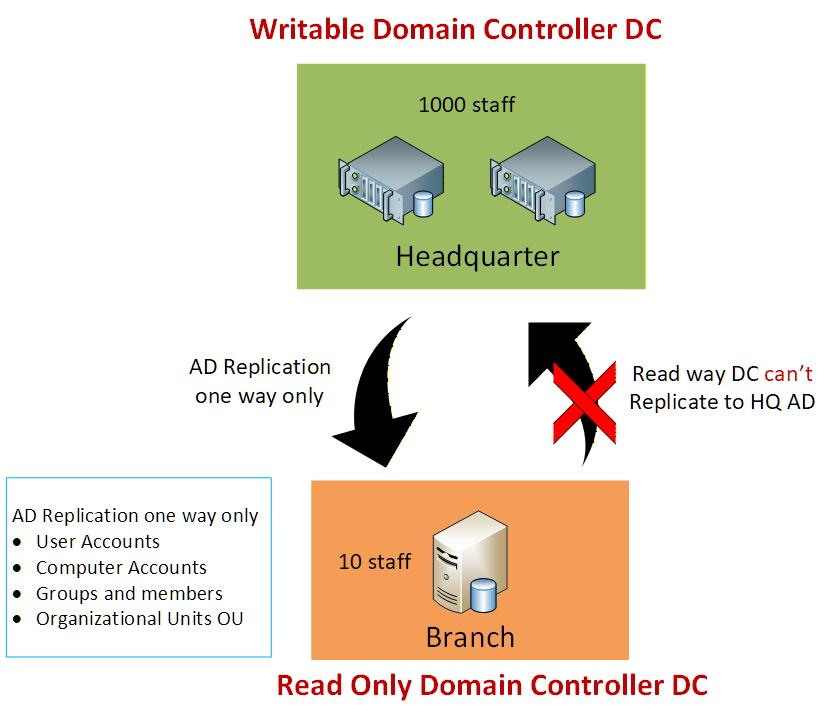
Fig:-1
What is an RODC – Read Only Domain Controller ?
RODC Read-Only Domain Controller is a replica of an Active Directory Domain Controller but only with read only permission. Since it is read-only, you cannot make any changes, like adding users or modifying group policies, directly on the RODC.
In simple terms, RODC is a copy of the main DC (Domain Controller) or Headquarter as shown in Fig:-1 above where we cannot perform any configuration.
Use Cases for RODC:
✅ Do you have limited administrative control?
✅ Do you have remote or unsecured locations?
✅ Do you have a remote site with limited network bandwidth?
If you have all of the above, then you definitely need an RODC. It is typically used in branch offices where there is minimal staff, no on-site IT administrator, and lower physical security. In such cases, an RODC is a good solution.
RODC also supports a feature called credential caching, which allows users in the branch office to log in even if the main HQ Headquarter Domain Controller is down.
RODC vs AD DC (Active Directory Domain Controller)
RODC (Read-Only Domain Controller) and AD DC (Active Directory Domain Controller) are similar in many ways. Both run on Windows Server and help manage users and other resources in a domain.
The main difference is that RODC is read-only, meaning the RODC receives updates from the headquarters Domain Controller (writable DC) but does not replicate changes back. This is known as one-way replication.
In contrast, an AD DC is a writable Domain Controller that manages all domain functions such as creating users, applying Group Policies, and managing printers and desktops. All configurations and updates are performed on the AD DC, which then replicates changes to any RODCs.
.